> ## Documentation Index
> Fetch the complete documentation index at: https://docs.datanumia.com/llms.txt
> Use this file to discover all available pages before exploring further.
# APIs and Webcomponents
## API ⚙️
Home API is based on HTTPS, REST API, OpenAPI and OAuth2.
[See more details in this section.](/docs/DeveloperTools/APIReference/01-api-overview)
## Webcomponent 🏠
**Home Interfaces** is a **catalog of user interfaces** built on top of the functionalities provided by our APIs.\
It offers **seamless integration**, requires **minimal efforts to set up**, and delivers **great functionaltities** across **multiple devices**.
These interfaces are grouped into **four packages** :
* One **technical** package that includes authentication and consent
* Three **functional** packages
***
🔧 **Home Requirements** - Available
Includes technical functionalities such as :
* Authentication
* User consent
***
📦 **Home Basic** - Available
Includes essential functionalities such as :
* Energy consumption measures
* Usage breakdown
* Consumption comparison
* Profile
***
🎯 **Home Coaching** - Coming soon
Includes **coaching-oriented** features such as:
* Consumption targets
* Best next actions
* Challenges
***
⚡ **Home Energy Management** - Coming soon
Includes advanced functionalities such as :
* Connect home equipments
* Monitor connected equipments
***
# Plug & Play via Web Components 🔌
All interfaces can be integrated into any mobile app or website in a **plug‑and‑play** manner thanks to **Web Components**.
[See more details in this section.](/docs/DeveloperTools/HomeInteface/01-how-to-insert-webcomponents-in-an-app)
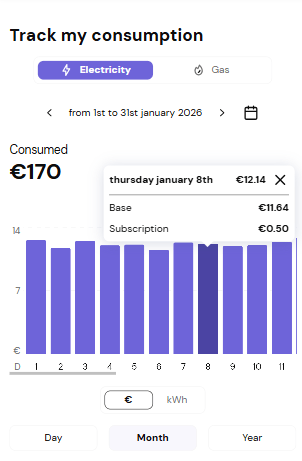
Each Web Component corresponds to a **specific functionality**.
For example, here is the **Consumption Chart** Web Component, linked to the functionality “Follow your energy consumption” :
 ***
# Style customization 🎨
The visual style of each Web Component can be adapted to match a **provider’s graphic charter**.
We provide a dedicated pre-configured stylesheet that fit your design system / grapich chart
[See customization documentation for details.](docs/DeveloperTools/HomeInteface/02-how-to-parameter-webcomponents)
***
# Style customization 🎨
The visual style of each Web Component can be adapted to match a **provider’s graphic charter**.
We provide a dedicated pre-configured stylesheet that fit your design system / grapich chart
[See customization documentation for details.](docs/DeveloperTools/HomeInteface/02-how-to-parameter-webcomponents)